Error formatters
Before being shown on the terminal, errors are forwarded to error formatters, which esentially convert the instance of the error into a printable string. They are able to format errors that were generated in the process of either tokenisation or parsing
Available formatters
Lanat provides the next error formatters:
- PrettyErrorFormatter
The default formatter. Displays on the terminal with the next format:
┌─$ERRORLEVEL $INPUT │ $CONTENTS └─────── ───── ── ─With the values being:
$ERRORLEVEL: The error level. ("ERROR", "WARNING", etc)
$INPUT: The whole input. Either all the tokens (colored), or the whole input string.
$CONTENTS: The content/description of the error. Properly wraps the text.
The generated text is colored according to the error level.
- SimpleErrorFormatter
Displays on the terminal within a single line, with the next format:
[$ERRORLEVEL (at $IN_TYPE $POS, "$INPUT"]: $CONTENTWith the values being:
$ERRORLEVEL: The error level. ("ERROR", "WARNING", etc)
$IN_TYPE: The type of the input where the error occurred. (either 'token' or 'char')
$POS: The position of the error in the input. (number)
$INPUT: The token at the position of the error, or the characters near the position.
$CONTENT: The content/description of the error.
The contents inside square brackets are colored according to the error level.
Creating a custom formatter
You can create a custom error formatter by creating a new class that extends ErrorFormatter and implements the required methods. An error formatter must be capable of formatting errors that ocurred when tokenizing or after so. This is an important note because, a parser error works with tokens, while a tokenizer error works with raw input text.
Here are the methods you are expected to implement:
- generateTokensView(ParseErrorContext ctx)
Returns a string for the representation of the input given in tokens. This method will only be invoked if the error this formatter is handling inherits
ParseError(most errors are of this kind)- generateInputView(TokenizeErrorContext ctx)
Returns a string for the representation of the input given in raw text. This method will only be invoked if the error this formatter is handling inherits
TokenizeError.- generate()
Generates the final formatted error message string that will be displayed to the user.
This method may use the
generateXViewmethods previously mentioned, but not directly. Instead, call thegetGeneratedView()method, which will call the appropiate method, supplying the matching error context to each.
The formatter is populated with the data given by the current error we are handling, such as its description, error level or the highlight options. However, the contexts supplied on the generateXView(), provide a finer access and manipulation of error type specific properties.
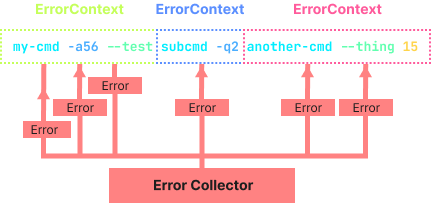
ErrorFormatter provides you with a few useful methods such as getContent(), getDisplayOptions(), getErrorLevelFormatter(), etc, to make it easier for you to generate the output.
Here's a simple example of a custom error formatter:
To easily test it out and see how it performs, let's create this little snippet;
Here we create a completely empty command, for this error, we don't really need to have any arguments or so added. Here's the output given by that:

And here's how it would look like if we actually supplied an incorrect value to some argument;
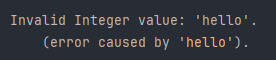
As you can see, depending on the kind of error (tokenizer or parser), the formatter displays it accordingly.